
Whether you're out of town for the day or going on vacation for a couple of weeks you may wish to pause your Hibou Wellness Check. You can do this easily and quickly from either your Mobile App or the Web App, see the step by step instructions below:
Step 1: Log in to Hibou
If you're not already logged into Hibou make sure you sign in so you can see the right settings
Step 2: Access the setting menu from either the left side of the screen or the top of the screen
Once in the Setting menu, you will want to locate "Wellness Check Pause" and click on it

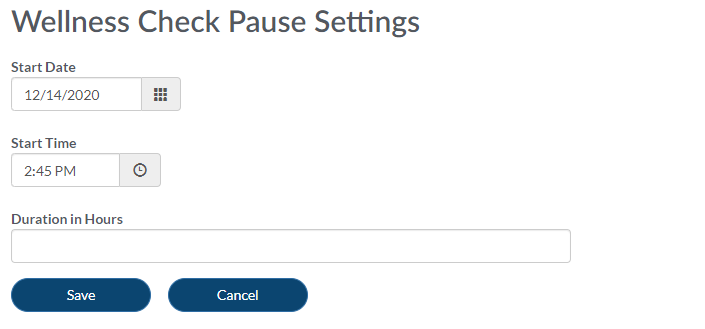
Step 3: Configure length of your Wellness Pause
Here you can configure which date the pause starts on, what time you would like the pause to start and finally the length of time in hours you would like the pause to run for. When the pause time is over you will receive Hibou Wellness Checks at your regular interval as you did before
Comments
0 comments
Please sign in to leave a comment.