
Start a new Activity with Hibou
- Begin by logging into Hibou
- After logging in select 'Start Activity' in the center of the screen
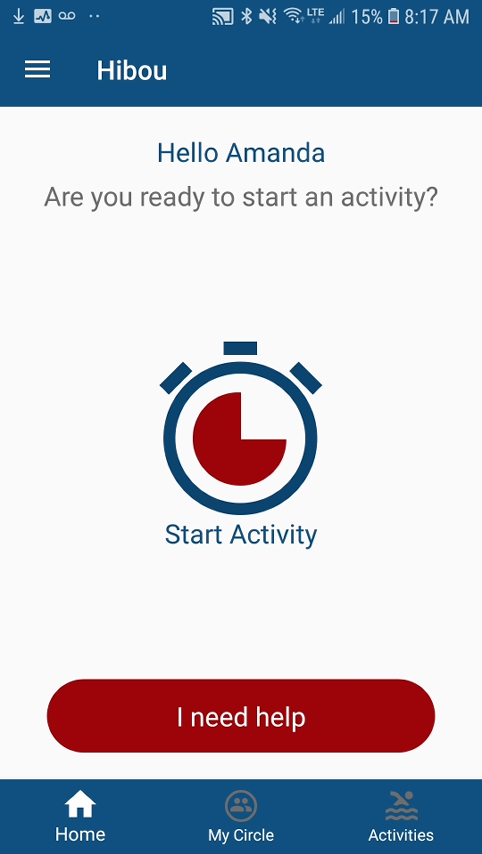
Select 'Start Activity'
- Next, you will want to type in the name of the chosen Activity (e.g., Hike, Swimming etc), select the duration of your chosen Activity and determine if it is High Risk (if High Risk, the grace period before contacting circle members will be shorter). Select 'Start Activity' to begin monitoring

Fill in required fields and then select 'Start Activity' to begin monitoring
Once you have started your Activity, your timer will begin to countdown. During this period you can either End Activity by selecting the icon in the center, or you can add additional duration time in 5 minute increments.

Starting an Activity
View previously created Activities
When creating a new activity like above, it will store in the 'Activties' section in the bottom menu of the Hibou App. This will allow you to quickly start an activity without having to enter all the same information again and again.
- To view all previously entered Activities, select 'Activities' in the menu below
- Once selected, you will be brought to a list view of all previously entered activities
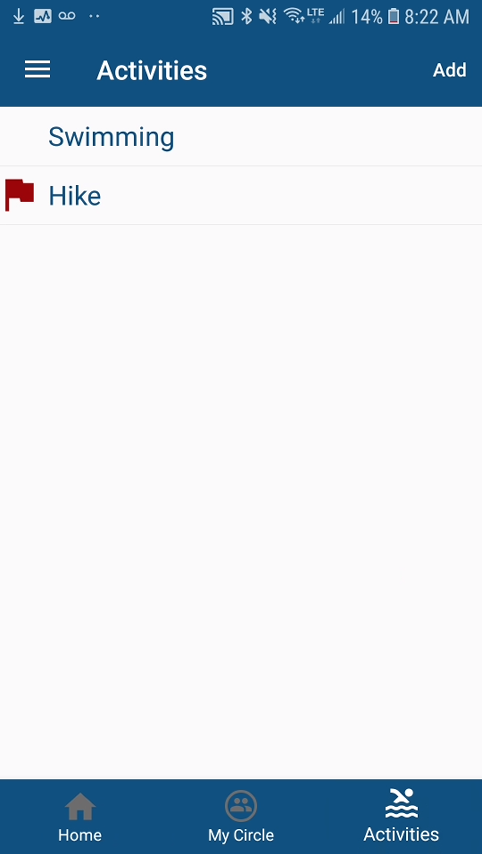
View all your created activities
**All Activities with a red flag were determined 'High Risk' upon creation
Comments
0 comments
Please sign in to leave a comment.